Using Terraform and GitHub Actions for Drift Detection and Correction
Terraform with AWS : Day - 30

Infrastructure drift is one of the most common problems in cloud environments. Someone changes a setting in the AWS console, a hotfix is applied manually, or a script updates a resource outside Terraform. Over time, what is running in AWS no longer matches what is defined in code.
In this blog, we set up drift detection and remediation using Terraform and GitHub Actions. The goal is simple: detect drift early and fix it automatically using Infrastructure as Code.
What Is Infrastructure Drift
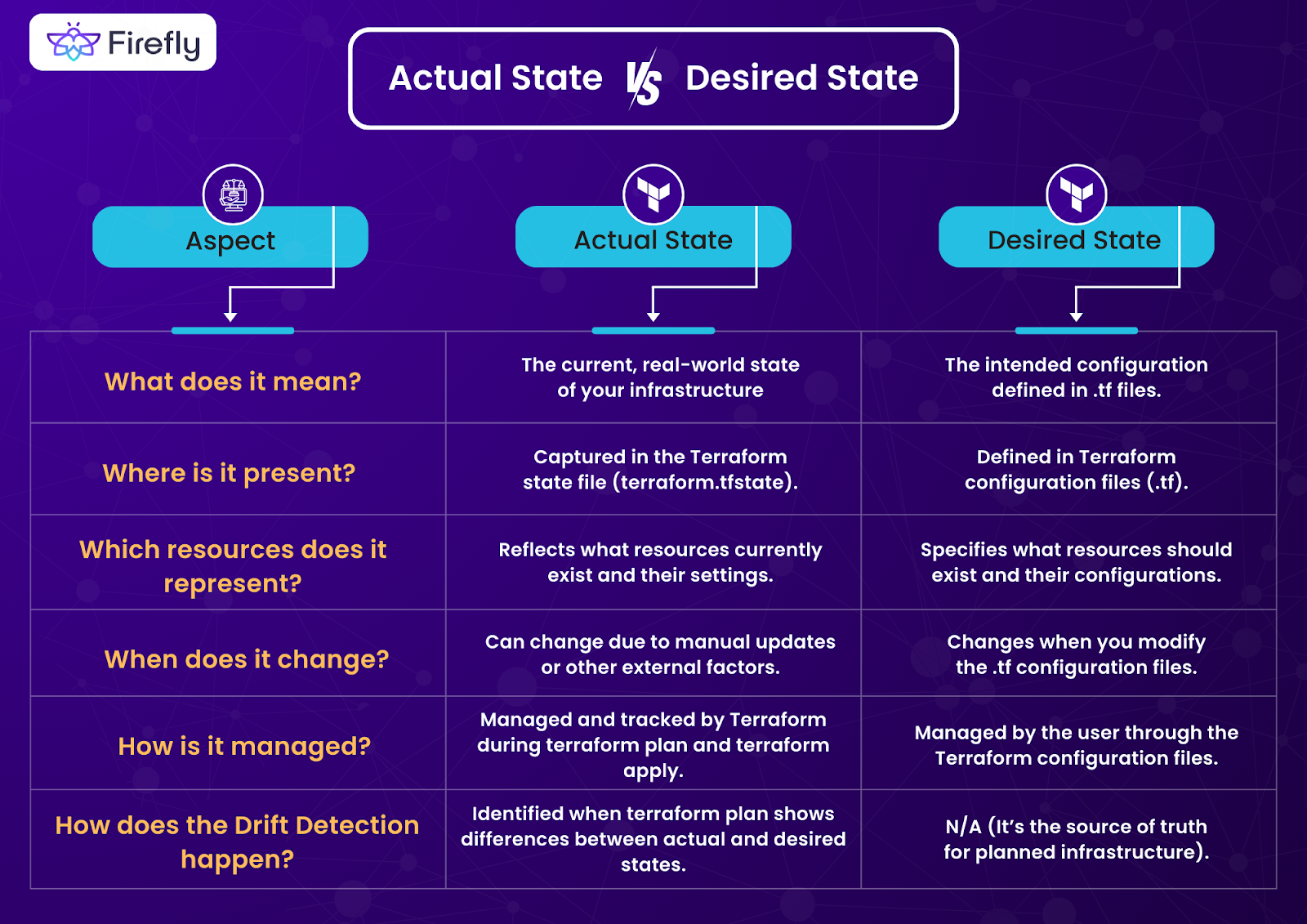
Infrastructure drift happens when the real infrastructure differs from the desired state defined in Terraform.
Common causes:
Manual changes in AWS console
Emergency fixes not added back to code
Multiple people managing the same resources
Partial automation
Think of Terraform code as a blueprint. Drift happens when the building no longer matches the blueprint.
Why Drift Is Dangerous
Terraform plans become unpredictable
Production behavior changes silently
Security rules may be weakened
Rollbacks become risky
Drift does not usually break things immediately. That is what makes it dangerous.
Architecture
Developer / Team
      |
      | Terraform Code (Desired State)
      v
Git Repository (GitHub)
      |
      | Scheduled Trigger (Cron) or Manual Trigger
      v
GitHub Actions Workflow
      |
      | terraform init
      | terraform plan -detailed-exitcode
      v
Drift Detection Logic
      |
      | Exit Code = 0 → No Drift
      | Exit Code = 2 → Drift Detected
      v
Decision Layer
      |
      |-- Notify Team (Slack / Email / GitHub Issue)
      |
      |-- Optional Auto Remediation
      |        |
      |        | terraform apply
      |        v
      |   AWS Infrastructure Updated
      |
      v
AWS Infrastructure
(Current State)


GitHub Actions runs Terraform regularly to compare desired state with actual state.
Core Tools Used
Terraform for defining desired state
GitHub Actions for automation
AWS as the infrastructure provider
Terraform is developed by HashiCorp and provides built in drift detection through terraform plan.
How Terraform Detects Drift
Terraform detects drift by:
Reading the current state from AWS
Comparing it with Terraform configuration
Showing differences in
terraform plan
No special plugin is required. Drift detection is a native Terraform feature.
Drift Detection Workflow
Step 1: Scheduled Terraform Plan
A GitHub Actions workflow runs on a schedule.
name: Terraform Drift Detection

on:
  schedule:
    - cron: "0 */6 * * *"   # every 6 hours

jobs:
  drift:
    runs-on: ubuntu-latest

    steps:
      - uses: actions/checkout@v4

      - uses: hashicorp/setup-terraform@v3

      - name: Terraform Init
        run: terraform init
        working-directory: terraform

      - name: Terraform Plan
        run: terraform plan -detailed-exitcode
        working-directory: terraform
Terraform exit codes:
0 means no drift
2 means drift detected
1 means error
This makes drift machine readable.
Alerting on Drift
When drift is detected, the workflow can:
Fail the job
Send notifications
Create GitHub issues
This ensures teams know about drift quickly, not weeks later.
Automated Remediation
In controlled environments, drift can be fixed automatically.
- name: Terraform Apply
  if: failure()
  run: terraform apply -auto-approve
  working-directory: terraform
This reverts infrastructure back to the declared state in code.
For production, remediation is usually gated behind approvals.
Safe Remediation Strategy
Best practice approach:
Detect drift automatically
Notify team immediately
Review terraform plan output
Apply fix via pull request or approved workflow
Automation should fix drift, not hide it.
Example Drift Scenario
Someone manually opens port 22 to the world in a security group.
Terraform detects:
Current state allows 0.0.0.0/0
Desired state restricts access
The next scheduled run flags the drift and either alerts the team or restores the secure configuration automatically.
Best Practices for Drift Management
Run drift detection on a schedule
Use read only plans for production detection
Never ignore terraform plan output
Restrict console access in production
Enforce all changes through Git
Log and audit all remediation actions
Drift prevention is as important as drift detection.
Common Mistakes to Avoid
Running terraform apply without reviews in production
Ignoring drift alerts
Mixing manual and automated changes
Using admin level IAM permissions
Running drift checks only occasionally
Drift is inevitable. Unmanaged drift is optional.
Final Thoughts
Drift detection and remediation turn Terraform into a continuous control system, not just a deployment tool. With GitHub Actions, this control runs automatically and consistently.
When infrastructure always returns to the declared state, teams regain trust in their systems. That confidence is what allows teams to move fast without fear.


