How to Automate AWS Infrastructure with Terraform and GitHub Actions
AWS with Terraform : Day - 27

Manually running Terraform from a laptop does not scale. It introduces risk, inconsistency, and dependency on individuals. Infrastructure should be deployed the same way application code is deployed, automatically and predictably.
In this blog, we build an end to end automation pipeline to provision AWS infrastructure using Terraform and GitHub Actions. The goal is simple: push code to GitHub and let the pipeline handle the rest.
Why Automate Infrastructure
Automation helps you:
Avoid manual mistakes
Enforce consistent deployments
Track changes using Git history
Enable team collaboration
Promote infrastructure changes safely
Think of it like setting up autopilot. You define the rules once and let the system follow them every time.
High Level Architecture
Developer
   |
   | git push
   v
GitHub Repository
   |
   | triggers workflow
   v
GitHub Actions
   |
   | terraform plan and apply
   v
AWS Infrastructure
The entire flow is event driven and repeatable.

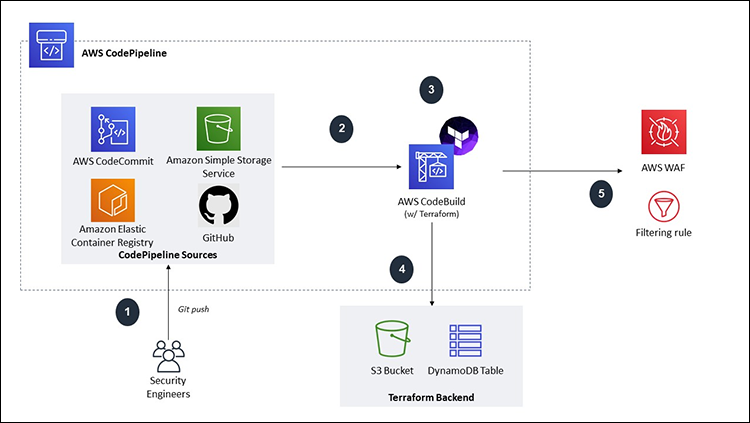
Tools Used
Terraform for Infrastructure as Code
AWS as the cloud provider
GitHub Actions for CI CD automation
GitHub repository as the source of truth
Terraform itself is developed by HashiCorp.
Repository Structure
A clean structure keeps automation simple.
repo/
│
├── terraform/
│   ├── main.tf
│   ├── variables.tf
│   └── outputs.tf
│
└── .github/
    └── workflows/
        └── terraform.yml
Terraform code lives in one place. Automation lives in another.
AWS Authentication Strategy
The pipeline needs permission to deploy resources.
Best practice is to use:
IAM role with limited permissions
GitHub OIDC to assume the role
This avoids storing long lived AWS access keys.
At a high level:
GitHub Actions authenticates to AWS
AWS trusts GitHub via OIDC
Terraform runs with temporary credentials
Sample Terraform Code
A simple example resource.
provider "aws" {
  region = "us-east-1"
}

resource "aws_s3_bucket" "demo" {
  bucket = "terraform-github-actions-demo"
}
This code does not change whether it runs locally or in GitHub Actions.
GitHub Actions Workflow
terraform.yml
name: Terraform AWS Deploy

on:
  push:
    branches:
      - main

jobs:
  terraform:
    runs-on: ubuntu-latest

    steps:
      - name: Checkout code
        uses: actions/checkout@v4

      - name: Setup Terraform
        uses: hashicorp/setup-terraform@v3

      - name: Terraform Init
        run: terraform init
        working-directory: terraform

      - name: Terraform Plan
        run: terraform plan
        working-directory: terraform

      - name: Terraform Apply
        run: terraform apply -auto-approve
        working-directory: terraform
This workflow:
Runs on every push to main
Initializes Terraform
Shows the plan
Applies changes automatically
For production, apply should usually require approval.
Environment Separation
A common pattern is:
Plan on pull requests
Apply only after merge
You can also create:
Separate workflows for dev and prod
Separate AWS accounts
Separate Terraform state backends
Automation grows with your needs.
Handling Secrets
Never hardcode secrets.
Use:
GitHub encrypted secrets
Environment variables
IAM roles with OIDC
Examples:
AWS_ROLE_ARN
AWS_REGION
Terraform picks these up automatically.
Benefits of This Setup
Consistency
Every deployment follows the same steps.
Traceability
Every change is tied to a commit and a workflow run.
Safety
No one applies changes directly from their laptop.
Scalability
Works for one environment or many.
Common Mistakes to Avoid
Running terraform apply on every branch
Using admin level IAM permissions
Storing AWS keys in GitHub secrets unnecessarily
Skipping terraform plan review
Mixing manual and automated changes
Automation works best when it is strict and predictable.
Final Thoughts
Automating AWS infrastructure with Terraform and GitHub Actions is a major step toward mature DevOps practices. It treats infrastructure like software, with version control, reviews, and automated execution.
Once this pipeline is in place, infrastructure changes become boring. And boring is exactly what you want in production.


